How to Redeem Escooter World Codes
Find the Shop code box, enter strings exactly, and fix common redeem errors fast.
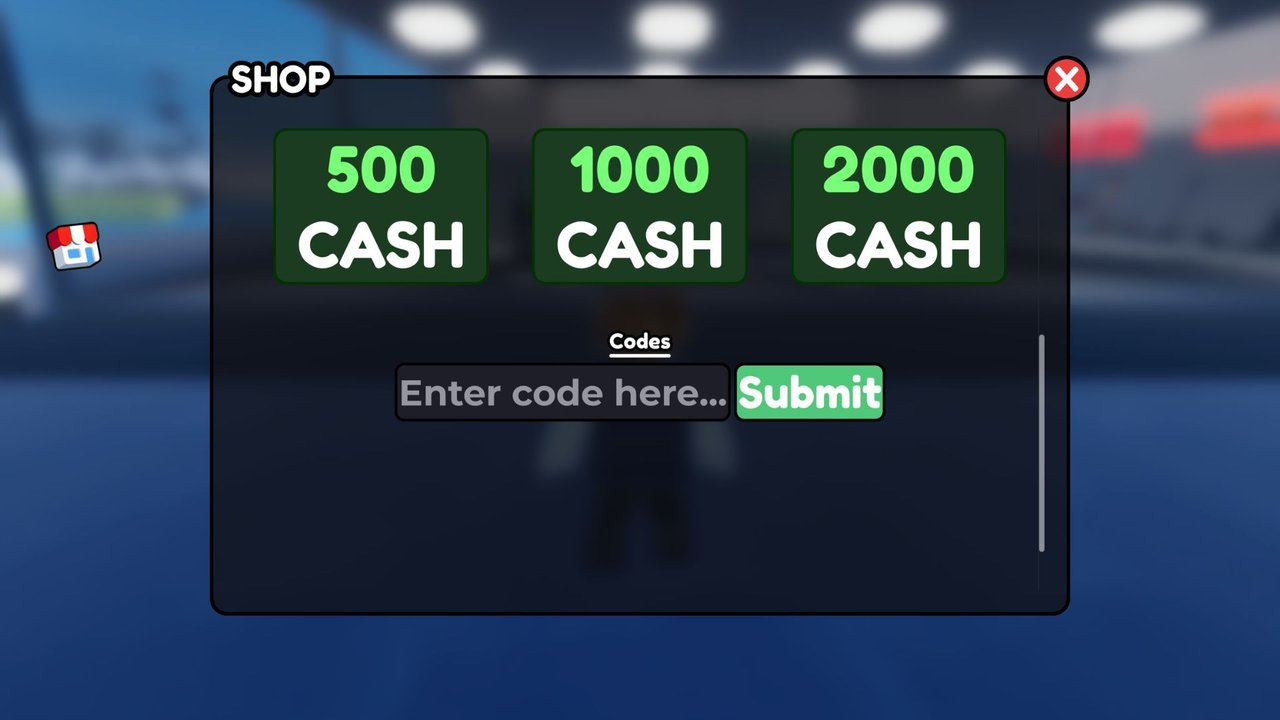
Redeeming codes in Escooter World (Ausom Scooter World! on Roblox) is simple once you know where the Shop UI hides the input box. This guide walks through the full path, shows how to avoid invalid-code mistakes, and explains what to do after Cash hits your balance. Pair it with the live list on the Codes Hub so you always paste a working string.
Official codes are free soft-currency gifts from Creator Scoots / Gogos Games Studios. They are not Robux vouchers, not private-server keys, and not Discord bot commands. Everything happens inside the live experience after you press Play.
Before you start
- Use the official place: search for Ausom Scooter World or open it from the Gogos Games Studios group.
- Wait until the open world finishes streaming. Redeeming during the load screen often fails silently.
- Make sure you are not in a broken soft-lock (stuck ragdoll, race UI covering the HUD). Reset or rejoin if needed.
- Keep the Codes Hub open on a second monitor or phone so you can copy strings without guessing spelling.
New players who have never opened the Shop should skim Getting Started first. The left-side Shop button is the same entry point used for scooter purchases and the code field.
Exact redeem path
Follow these steps in order:
- Join the experience and land in the open world with a normal HUD.
- Look to the left side of the screen for the Shop button.
- Open Shop and scroll through the panels until you reach the code input box. It sits below the main purchase lists on many layouts, so do not stop at the first scooter tile.
- Click or tap the text field so the cursor is active.
- Enter the code exactly as published. Prefer paste over retyping when you can.
- Press Submit.
- Watch for a success toast, Cash popup, or an immediate balance change in the Shop header.
If nothing appears, close and reopen Shop, then check the Cash total again. Some sessions need a single rejoin before the client refreshes currency displays.
Active codes to try (November 2026)
Use these strings from the Codes Hub while they remain valid:
| Code | Reward |
|---|---|
COMPENSATION | 75,000 Cash |
THANKYOUFORWAITING | 75,000 Cash |
SORRY4DATALOSS | 75,000 Cash |
SCOOTEREALISM | 500 Cash |
Claim all four if your account has never redeemed them. The three compensation gifts alone are worth 225,000 Cash, which is enough to jump several scooter tiers when spent carefully with the Tier List.
Typing rules that matter
- Case sensitive: enter letters exactly as shown.
compensationis not the same asCOMPENSATIONif the game expects uppercase. - No spaces: do not add a trailing space after paste. Clear the field and paste again if Submit fails once.
- No quotes: never include markdown backticks or quotation marks from a wiki copy.
- One code at a time: clear the box between attempts so two strings do not merge.
- Full string:
THANKYOUFORWAITINGis long—do not truncate it toTHANKYOU.
Mobile players should paste from the clipboard instead of tapping letter by letter. Long codes are where most typos happen.
Common errors and fixes
Invalid code
Double-check spelling against the Codes Hub. If the hub still lists it as working, try once more with a fresh paste. If it still fails for everyone, the code likely expired between updates—recheck Updates and Discord announcements.
Already redeemed
That Roblox account already claimed the gift. You cannot farm the same official code repeatedly on one user. An alt account can redeem again while the code is live.
Submit does nothing
HUD focus bugs happen after races, crashes, or emote menus. Close Shop, hop off your scooter, reopen Shop, and retry. If the whole left toolbar is missing, rejoin the server.
Cash did not move
Sometimes the reward applies but the label lags. Reopen Shop, switch scooters, or rejoin once. If the balance is still flat and the game said success, contact studio support through official channels—not random Discord DMs.
Wrong experience
Lookalike scooter places will not accept Ausom Scooter World codes. Confirm the creator line shows Creator Scoots / Gogos Games Studios and that you are in the universe tied to this wiki.
Redeeming on alts and multiple devices
Each Roblox account has its own claim state. If you main on one account and practice on another, redeem the full set on both while codes remain active. Log out fully before switching accounts on the same device so Shop does not show a cached balance from the wrong user.
Console and PC share the same account-wide redeem state. You do not get a second claim just because you switched platforms.
What to buy after Cash lands
Do not impulse-buy the first neon scooter on the shelf. Use a short plan:
- Stabilize your daily ride. If you are still on a fragile starter, move into a dependable Ausom Leopard, Gallop, or Leopard Pro—or a KuKirin that matches your trail style. Cross-check rankings on the Tier List.
- Keep a Cash buffer. Street Races, repairs after ragdoll crashes, and shop rotations all cost money. Blowing every compensation dollar the same minute you redeem leaves you stuck again.
- Invest in skill next. Wheelie Bonus income scales with clean riding. Codes accelerate the bank; practice multiplies it. Return to the Guides Hub for progression routes after you pick a scooter.
- Track patches. Prices and model stats can shift—skim Updates after big drops.
Players who also experiment with community automation should read the Scripts Hub before mixing executors with a fresh Cash pile. Official codes never require an executor.
Where codes come from
Studio drops usually follow:
- Extended downtime or data-loss events (the November compensation set is a clear example)
- Community thank-you moments after long waits
- Major content updates for trails, races, or new scooter lines
Watch the official Discord invite, the Gogos Games Studios community, and this wiki’s Codes Hub plus Updates feed. When a new string appears, redeem it the same day—compensation windows can be short.
Safety checklist
- Redeem only in the in-game Shop code box.
- Never type your Roblox password into a “code redeem” website.
- Ignore anyone selling “private codes” for Robux or asking you to download a random APK.
- Official rewards are Cash, not limited UGC that bypasses Roblox trading rules.
- If a stranger offers to “redeem for you” on your account, decline and change your password.
Related wiki links
- Codes Hub — live working table
- Getting Started — HUD and early unlocks
- Guides Hub — money and riding systems
- Tier List — spend Cash on scooters that last
- Scripts Hub — optional community tools and risks
- Players — creators and community pointers
- Wiki — full site map
Master the Shop path once and every future code drop takes under a minute. Keep this redeem guide bookmarked beside the Codes Hub, paste carefully, and convert those compensation payouts into a scooter that can actually survive open-world trails and Street Race lobbies.
Frequently Asked Questions
Quick answers to the most common questions.
Where is the code box in Escooter World?
Open the Shop button on the left side of the HUD, then scroll until you see the code input field below the main purchase panels.
Why does my code say invalid?
Most often the string is mistyped, has an extra space, uses the wrong case, or has already expired. Compare it to the Codes Hub and paste again.
Can alts redeem the same Escooter World codes?
Yes. Claim status is per Roblox account. Each alt can redeem active codes once while they still work.
Do I need Robux to redeem codes?
No. Official promo codes are free and grant in-game Cash only.
What should I buy after redeeming COMPENSATION?
Prioritize a stable daily scooter from the Tier List, keep a Cash buffer for races and repairs, then invest time in Wheelie Bonus practice.