Escooter World Codes
Active promo codes, cash rewards, and fast redeem steps for Ausom Scooter World.
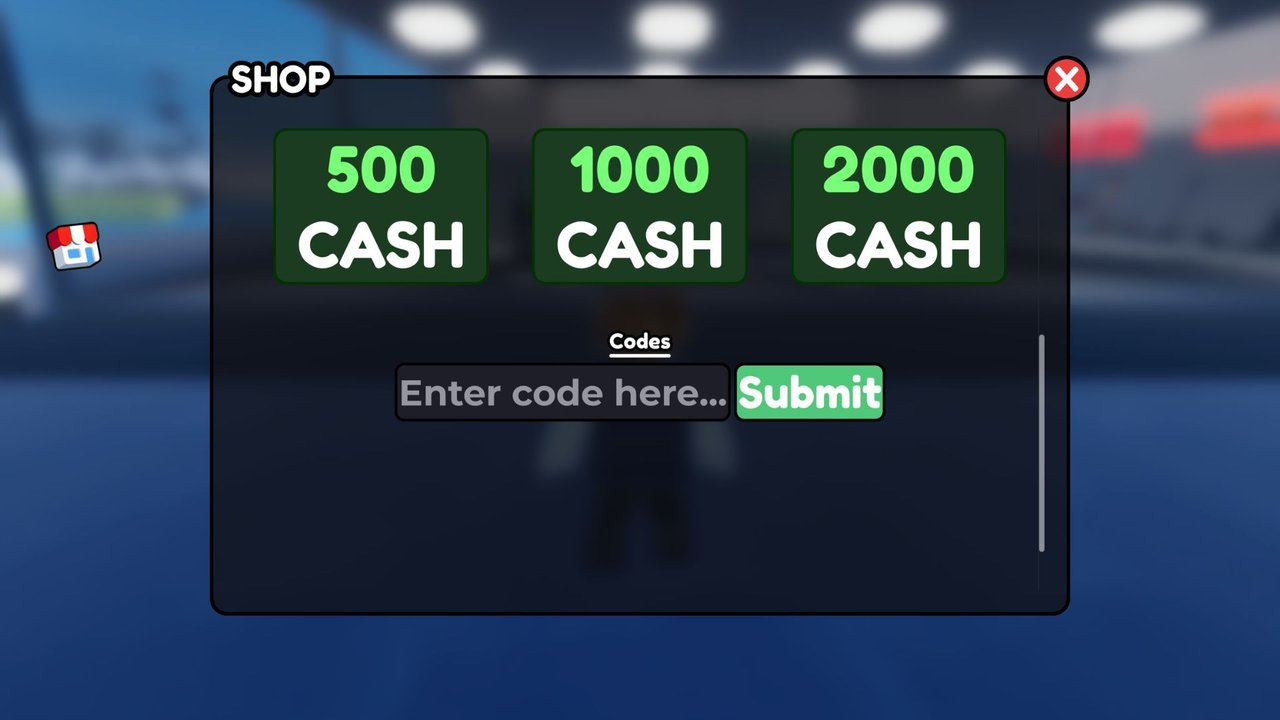
Promo codes are one of the fastest ways to stack Cash in Escooter World (official Roblox title: Ausom Scooter World!). This hub lists every working code we track as of November 2026, explains what each reward pays out, and points you to a full redeem walkthrough so you do not mistype a gift and waste the attempt.
Codes here are free. You do not need Robux to claim them. You do need an active session in the experience, and you must enter each string exactly as shown—case and spelling both matter.
If you are brand new, skim Getting Started first so you know where the Shop UI lives, then come back here to cash in. For deeper redeem troubleshooting, open the dedicated How to Redeem Codes guide.
Active codes (November 2026)
| Code | Reward | Notes |
|---|---|---|
COMPENSATION | 75,000 Cash | Working |
THANKYOUFORWAITING | 75,000 Cash | Working |
SORRY4DATALOSS | 75,000 Cash | Working |
SCOOTEREALISM | 500 Cash | Working |
Together, the three large compensation codes alone dump 225,000 Cash into your balance if none of them were claimed yet. SCOOTEREALISM is a smaller thank-you drop that is still worth grabbing on every alt you play.
Redeem order does not matter. Claim the big three first if you want an instant scooter upgrade budget, then finish with the smaller code. After redeeming, open the Shop again and confirm your Cash total moved—if the UI did not refresh, rejoin once and check again.
Quick redeem steps
- Launch Ausom Scooter World and wait until the world fully loads.
- Tap the Shop button on the left side of the HUD.
- Scroll until you see the code input box.
- Paste or type the code exactly (no spaces before or after).
- Press Submit and watch for the Cash toast or balance update.
That five-step loop is enough for most players. If Submit does nothing, the code box rejects the string, or you already claimed the gift, jump to How to Redeem Codes for fixes, common error patterns, and alt-account tips.
What Cash is for
Cash is the main soft currency that buys and upgrades electric scooters in the open world. Early money goes toward a reliable Ausom platform (Leopard, Gallop, or Leopard Pro lines) or a KuKirin model that matches how you like to ride. Later spending fuels cosmetics, race readiness, and the gear that helps you hold Wheelie Bonus streaks without ragdolling into traffic.
Codes will not replace smart grinding forever, but a 75,000 Cash dump can skip hours of slow early farming. Pair redeemed Cash with the economy tips in our Guides Hub and the scooter rankings on the Tier List so you do not blow a compensation payout on a mid scooter you will replace in one session.
Where new codes appear
The developers drop codes after downtime, data issues, milestone thank-yous, and big content pushes. Reliable places to watch:
- The official Discord announcement channels
- The Gogos Games Studios community page and group shout
- In-game patch notes and Updates coverage on this wiki
- Creator Scoots / studio social posts when a compensation wave is live
We refresh this hub when a new string is confirmed working. Bookmark the page and recheck after any server-wide outage—compensation codes often land in the same window as the apology post.
Expired and invalid codes
If Submit returns an invalid or already-used response, the code is either expired, mistyped, or already claimed on that Roblox account. Do not spam Submit; fix the spelling first, then try once more. Codes are almost always one claim per account, not per server or per scooter.
We keep expired strings off the active table so you do not waste time. When a code dies, it moves out of the working list on the next content pass. If a friend sends you a screenshot of an old code, verify it against this page before trusting the image.
Safety and account notes
- Only redeem inside the official experience Shop UI. Never paste a “code” into a third-party website that asks for your password.
- Escooter World codes grant Cash, not free Robux. Any site promising Robux for these strings is a scam.
- Script tools that auto-redeem or inject fake paycheck events are unrelated to official codes. If you still explore that side of the community, read the Scripts Hub disclaimers first and prefer an alt account.
- Keep your Discord and Roblox logins separate from random “code generator” bots.
After you redeem
Spend with a plan:
- Cover a stable daily scooter if you are still on a starter ride—see Getting Started and the Tier List.
- Save a Cash buffer for repairs, race fees, or the next shop rotation.
- Practice wheelies and Street Races so passive income rises even when no codes are live.
- Recheck Updates after patches; reward values and shop prices can shift.
New players should also skim the Players hub for creator and community links, and the main Wiki overview if you want the full map of this site.
Related pages
- How to Redeem Codes — full UI path, typos, and troubleshooting
- Guides Hub — progression, controls, and money routes
- Getting Started — day-one checklist
- Scripts Hub — community automation (use at your own risk)
- Tier List — which scooters deserve your Cash
- Updates — patch notes that often ship with new codes
Stay on this hub for the live table; use the redeem guide when something fails. Claim the November 2026 codes while they still work, then convert that Cash into a scooter that survives open-world trails, ragdoll crashes, and Street Race lobbies.
Frequently Asked Questions
Quick answers to the most common questions.
What are the working Escooter World codes right now?
As of November 2026 the working codes are COMPENSATION (75,000 Cash), THANKYOUFORWAITING (75,000 Cash), SORRY4DATALOSS (75,000 Cash), and SCOOTEREALISM (500 Cash).
How do I redeem a code in Ausom Scooter World?
Open the Shop button on the left side of the HUD, scroll to the code box, enter the string exactly, and press Submit. Full steps are on the How to Redeem Codes page.
Do Escooter World codes give Robux?
No. Official promo codes grant in-game Cash only. Any site promising Robux for these codes is a scam.
Can I redeem the same code twice?
Usually no. Each code is limited to one successful claim per Roblox account. Alts can redeem separately if the code is still active.
Where do new codes get announced?
Watch the official Discord, the Gogos Games Studios group, in-game notices, and this Codes Hub after major downtime or updates.